 UGTKengine within an engine
UGTK / Systems / Gameplay Systems / Tris System Completed

Tris System
Summary
A Tic-Tac-Toe minigame framework with four game modes (Classic, Matriosca, Sliding, Ultimate), configurable 1v1 or 1-vs-AI matches, per-mode AI brains and a shared setup / endgame UI.
Content
Modules Dependencies
This module has no hard UGTK cross-module dependencies (it uses only its own UGTK.Minigames.TrisSystem namespace). It relies on Unity uGUI and TextMeshPro for its UI.
Carried inside the prefabs. These modules are not referenced by the assembly definition - the components are simply already attached to the prefabs this module ships. Remove one of them from the project and the prefab keeps its layout and loses that behaviour, with nothing in the console to say so.
| Module | Component, and the prefab carrying it |
|---|---|
UIModule/SceneSystem |
Mn_OpenScene (in EndingScreen) |
UtilitySystems/ActivationSystem |
Mn_GameObjectActivation (in AndroidStartingScreen), Mn_GameObjectActivation (in DesktopStartingScreen) |
Setup
Create SO_CharacterSign assets (UGTK/Tris/CharacterSign) with a sign sprite and opponent sign. Build a setup scene with Mn_GameStarter and the selector components, then create one game scene per mode with the matching Mn_*_GameManager and its board UI.
How To Use
- Configure the match in a setup scene:
Mn_GameStartercollects nicknames, chosen signs, starter, match type and AI difficulty. Helper UI components feed it:Mn_SignChoice(cycle signs),Mn_MatchType,Mn_Starter,Mn_IADifficultSelector,Mn_MatrioscaSelector, andTMPKeyboard(mobile input field keyboard). Mn_GameStarter.StartGame()validates the settings (CorrectInfos()blocks duplicate signs/nicknames in 1v1), stores them viaMn_GameSession.SetGameSessionSettings, and loads the selected mode scene.- In the game scene, the concrete
Mn_*_GameManagerreads the settings withMn_GameSession.GetGameSessionSettings(), decides the starter, and (forOneVersusAI) builds the mode's AI brain. Cells callTryPlaceSign(index); the manager checks win/draw and raisesonWin(nickname)/onDraw. - Endgame:
Mn_TrisEndgameUIdisplays the result.Mn_FieldGameBoardmanages the board cells/win state. - AI difficulty (
Facile/Normale/Difficile) maps to a probability (0.5 / 0.7 / 0.9) that the AI plays the optimal move.
Testing Scene
Open Tris_MainMenu in the module's Debug/ folder.
What to do, in order:
- Start from the menu and play a full classic match to a win.
- Play one to a draw, filling every square.
- Try to place a sign on a square that is already taken.
- Play the Matriosca, Sliding and Inception variants from their own scenes.
The interesting states of a board game are all at the end, and each takes a whole match to reach by hand — which is why the manager's inspector has a 3×3 grid that places a sign on any square directly. Leave Force place off while testing step 3: with the rules active, the illegal move has to be refused.
Start from Tris_MainMenu, choose a match type and a mode, press START, and play: pressing
a square places the sign and passes the turn, which is what the recording shows.
If the squares do nothing, you have an older copy. The board's On Pressed Field event was
wired to TryPlaceSign(int, bool), and a UnityEvent can only carry one serialisable argument - so
the inspector showed the listener as missing and every press went nowhere. There is now a
one-argument overload for the event to bind to, and the demo plays.
Technical Info
- Mn_Tris_GameManager: abstract base for all modes; holds turn state, the 3-in-a-row lookup table, timing, and shared flow (
NextTurn,PerformWin,PerformDraw); declares abstractTryPlaceSign,CheckWinCondition,CheckDrawCondition,AiTurn,GenerateAIBrain. - Mn_Classic_GameManager / Mn_Matriosca_GameManager / Mn_Sliding_GameManager / Mn_Ultimate_GameManager: the four mode implementations (classic 3×3; sized override signs; three-piece then slide; 3×3 grid of 3×3 grids).
- Mn_IABrain: abstract AI base with the win lookup table and difficulty-to-probability mapping; subclasses
Mn_TrisClassicIA,Mn_TrisMatrioscaIA,Mn_TrisSlideIAimplementGetMove. - Mn_GameSession: static holder passing
S_GameSessionSettingsbetween scenes. - Mn_GameStarter: setup-scene controller that validates and launches a match.
- Mn_FieldGameBoard / Mn_TrisEndgameUI / Mn_MatrioscaSelector / Mn_SignChoice / Mn_MatchType / Mn_Starter / Mn_IADifficultSelector / TMPKeyboard: board management and setup/UI helpers.
- SO_CharacterSign (+
SO_DrawSign): ScriptableObject sign with sprite and opponent reference. Enums:E_MatchType,E_IADifficult,E_Starter. Struct:S_GameSessionSettings.
© 2026 Marcello De Bonis. All rights reserved
More in Gameplay Systems.
all 18 →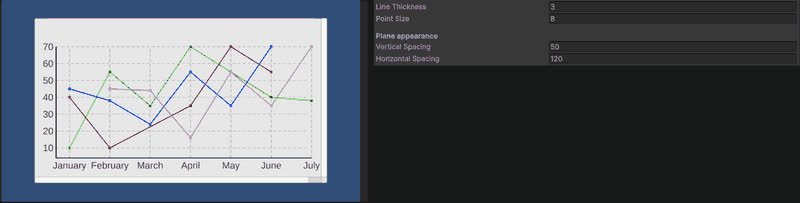
Line Chart (3D)
Line chart rendered in the world rather than on a canvas.
Completed
Audio System
Comprehensive audio management for playback control and volume adjustment.
Completed
Pause System
Manages the pause and resume of the game, allowing to pause the game and resume it at any time.
Completed
Grid System
Manage gameobject placed in a 2D or 3D grid layout
Completed