 UGTKengine within an engine
UGTK / Systems / Component Module / Level System Completed

Level System
Summary
The Level System module provides a set of classes that allow to manage xp and levels for a game character.
Each type of xp management has its own model growth of level from xp.
Content
Modules Dependencies
The Movement Component module requires the following dependencies:
- Generic Component: Provides the base classes and structure for all components.
Ensure that these dependencies are correctly imported and configured in your project.
Only in the demo scene. The Debug scene of this module also uses UIModule/SliderSystem, UIModule/TextUpdaterSystem.
Nothing in the runtime code needs them: import this module on its own and it works, but
the demo scene opens with missing scripts where those components were.
Setup
To set up the Movement Component module, follow these steps:
Choose Level System Type
Choose the type of level system you want to use:
- Scaled: The level grows by a factor of the xp.
- Find and put in a scene the prefab ScaledLevelComponent or add component Mn_ScaledLevelComponent to a GameObject.
- Costant: The level grows by a constant factor.
- Find and put in a scene the prefab ConstantLevelComponent or add component Mn_ConstantLevelComponent to a GameObject.
- Mapped: The level grows is manually mapped.
- Find and put in a scene the prefab MappedLevelComponent or add component Mn_MappedLevelComponent to a GameObject.
How to set up the components starting to what they share in common:
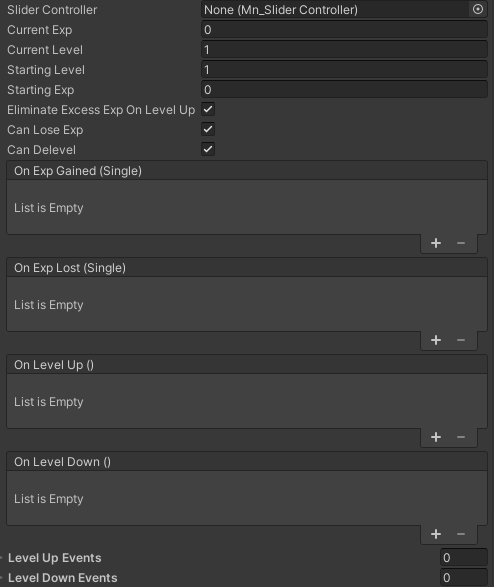
Sure, here is a description of each variable in the Mn_LevelComponent class:
sliderController: A reference to theMn_SliderControllerthat manages the EXP slider.maxExpForNextLevel: The maximum amount of EXP required for the next level.currentExp: The current amount of EXP the player has.currentLevel: The current level of the player.startingLevel: The starting level of the player, used during initialization.startingExp: The starting EXP of the player, used during initialization.eliminateExcessExpOnLevelUp: A flag to determine whether to remove excess EXP on level up.canLoseExp: A boolean to allow or prevent losing EXP.canDelevel: A boolean to allow or prevent deleveling (going down a level).onExpGained: An event triggered when EXP is gained.onExpLost: An event triggered when EXP is lost.onLevelUp: An event triggered when leveling up.onLevelDown: An event triggered when the player loses a level.levelUpEvents: A list of level up events for each level.levelDownEvents: A list of level down events for each level.
Scaled Level System
The Mn_ScaledLevelComponent class has the following additional variables:
levelMultiplier: The factor by which the level grows, the multiplier is multiplied by the current level to get the required EXP for the next level.
Constant Level System
The Mn_ConstantLevelComponent class has the following additional variables:
defaultMaxExpValue: The amount of EXP required for each level.
Mapped Level System
The Mn_MappedLevelComponent class has the following additional variables:
defaultMaxExpValue: The amount of EXP required for each level (Inherited fromMn_ConstantLevelComponent).levelExpMap: A dictionary that defines the required cp amount of a specific level, if not defined the default value isdefaultMaxExpValue.
How To Use
To put in use the Level System module, follow these steps:
Initialization
- Call the
Initmethod to initialize the level component. - The
Initmethod takes two parameters: the starting level and the starting EXP.
levelComponent.Init(1, 0);
Gain EXP
- Call the
GainExpmethod to gain EXP. - The
GainExpmethod takes anintparameter that represents the amount of EXP to gain.
levelComponent.GainExp(10);
Lose EXP
- Call the
LoseExpmethod to lose EXP. - The
LoseExpmethod takes anintparameter that represents the amount of EXP to lose.
levelComponent.LoseExp(10);
Testing Scene:
Testing Scene
Open LevelComponentScene in the module's Debug/ folder. Select the ScaledLevelComponent
under one of the three characters: everything happens in the Editor block of its inspector,
with the editor stopped.
What to do, in order:
- Press Gain EXP a few times and watch Current Exp and Current Level. With the default multiplier of 1.5 each level costs more than the last, so the same reward buys fewer levels as you climb.
- Press it enough times to cross several levels at once.
- Turn Eliminate Excess Exp On Level Up off and repeat step 2: the leftover experience now carries into the next level instead of being thrown away.
- Press Lose EXP with Can Delevel on, then off.
- Press Init to put the component back to Init Level and Init EXP.
Steps 2 and 3 change the pacing of a whole session, not a detail: with the excess discarded, a single large reward can never chain two level ups. Step 4 shows the difference between a level that is a floor and one that can be lost.
Technical Info
The following are the main scripts and workflow of the Level System module:
Scripts:
Mn_LevelComponent: The base class for all level components.Mn_ScaledLevelComponent: The class that manages the scaled level system.Mn_ConstantLevelComponent: The class that manages the constant level system.Mn_MappedLevelComponent: The class that manages the mapped level system.
© 2026 Marcello De Bonis. All rights reserved
More in Component Module.
all 16 →
Flip Component
Component for flipping sprites or objects along axes, useful for 2D character facing or UI mirroring.
Completed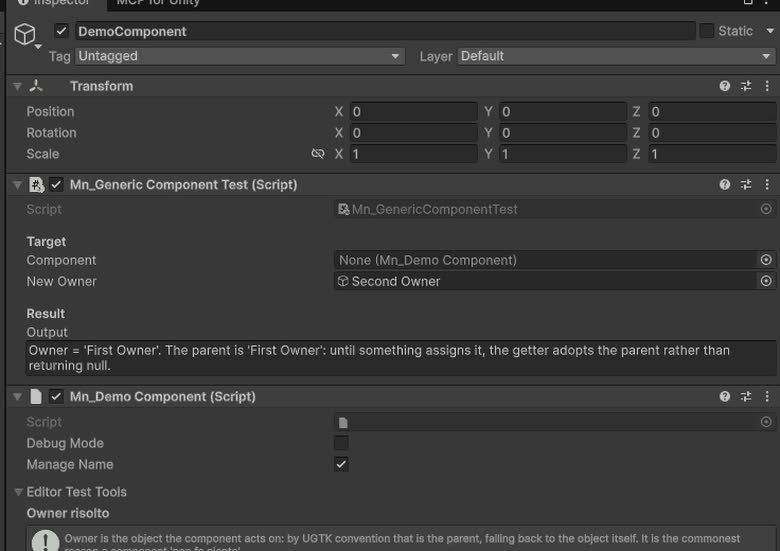
Generic Component
Provides the base classes and structure for all components.
Completed
Movement Component
Components for controlling object movement: speed, direction, bounds, and coordinate limits.
Completed
Rotation Component
The Rotation Component allows customizable game object rotation with animation curves, supporting continuous or timed rotations and event triggers.
Completed