 UGTKengine within an engine
UGTK / Systems / Ui Module / Jelly System Completed

Jelly System
Summary
The Jelly System applies a continuous idle squash/stretch animation to any transform — UI Image,
sprite or 3D object — with a single component, Mn_IdleJelly. Two sine waves are combined every
LateUpdate, so the motion never repeats mechanically and costs nothing but a couple of Mathf.Sin
calls per frame. No tweening library is required.
Note: for TextMeshPro text, the canonical way is now the per-character
<jelly>/<squash>/<breathe>tags of TextAnimatorUGTK. Keep this system for Images, buttons, sprites and whole objects.
Content
Modules Dependencies
None. The runtime assembly references nothing but UnityEngine, and the component works on any
Transform (uGUI, sprite or mesh).
Setup
Drop the JellyImage prefab under a Canvas — a 100×100 white Image with Mn_IdleJelly already
configured (Play On Start on, Animation Target pointing at itself) that starts pulsing as soon as you
press Play:
Or set it up by hand:
- Add Mn_IdleJelly to any GameObject (UI Image, sprite, 3D mesh). The component is
[DisallowMultipleComponent]: one per GameObject. - Optionally assign Animation Target — left empty, the component animates its own transform.
- Leave Play On Start on to run the loop automatically, or turn it off and call
Play()from code.
How To Use
Everything is driven from the inspector; the animation loops on its own while not paused:
Playback
- Play On Start: starts the loop in Start(). When off, the component starts paused.
Target
- Animation Target: the transform that gets scaled. Empty = this transform. Point it at a child so
the animated scale does not fight with a LayoutGroup driving the parent.
- Use Local Transform: serialized but not read by the current implementation — the scale is
always written to localScale. Leave it as is.
Wave - Speed (default 3.5): how fast the pulse runs. - Stretch X / Stretch Y (0.14 / 0.16): amplitude on each axis. X grows while Y shrinks, which is what reads as "squash & stretch". - Secondary Wave Mix (0.35): how much of a second, faster cosine is added on Y. Raise it for a wobblier, less regular feel; set it to 0 for a pure sine. - Secondary Wave Ratio (1.17) / Secondary Wave Offset (1.2): frequency and phase of that second wave. Keep the ratio off round numbers (1.17, not 2) so the two waves never resync.
Phase
- Use String Phase Seed + String Phase Scale: with Configure(seed), the phase is offset by
seed.GetHashCode() * stringPhaseScale, so a list of items animates out of sync instead of pulsing
as one block. The offset is stable within a session, not across builds — use it for variety, never
to persist a look.
Pause
- Reset Scale When Paused: on pause (and on OnDisable) the target's scale snaps back to
(1,1,1). Turn it off if something else owns the scale.
var jelly = GetComponent<Mn_IdleJelly>();
jelly.Play();                       // start / resume
jelly.Pause();                      // stop (and reset the scale)
jelly.Toggle();                     // flip — usable straight from a Button's onClick
bool running = jelly.IsPlaying;
jelly.Paused = true;                // same as Pause(), as a property
jelly.Pooled = true;                // alias of Paused, for pooling code that reads better this way

jelly.Configure(iconTransform, id); // bind a target + desync the phase from a string, then Play()
jelly.Configure(id);                // keep the current target, only desync the phase
Good to know:
- The loop runs in LateUpdate and uses Time.time, so it freezes with Time.timeScale = 0
(pause menus). Drive it yourself if you want it alive behind a pause screen.
- Configure(...) always calls Play(), even if the component was paused.
- The Z scale is forced to 1: the component is meant for 2D squash & stretch.
The custom inspector adds Play / Pause / Toggle buttons and a live state readout — they are only enabled in Play Mode, since there is nothing to drive in Edit Mode:
Testing Scene
Open Debug/JellyScene.unity and press Play: the JellyImage under the Canvas squashes and stretches
continuously:
Technical Info
| Path | Content |
|---|---|
Scripts/Runtime/Mn_IdleJelly.cs |
The whole system: two-wave squash/stretch in LateUpdate, playback API, phase seeding |
Scripts/Editor/Mn_IdleJelly_Editor.cs |
Custom inspector: help box, Play / Pause / Toggle buttons (Play Mode only), live state |
Prefabs/JellyImage.prefab |
100×100 white Image with Mn_IdleJelly pre-configured |
Debug/JellyScene.unity |
Test scene: Canvas + JellyImage |
Mn_IdleJelly API: Play(), Pause(), Toggle(), Paused, Pooled, IsPlaying, PlayOnStart,
Configure(Transform, string), Configure(string).
The maths, per frame: t = Time.time * speed + phase, then
scaleX = 1 + sin(t) * stretchX and
scaleY = 1 - sin(t) * stretchY + cos(t * ratio + offset) * stretchY * mix.
© 2026 Marcello De Bonis. All rights reserved
More in Ui Module.
all 34 →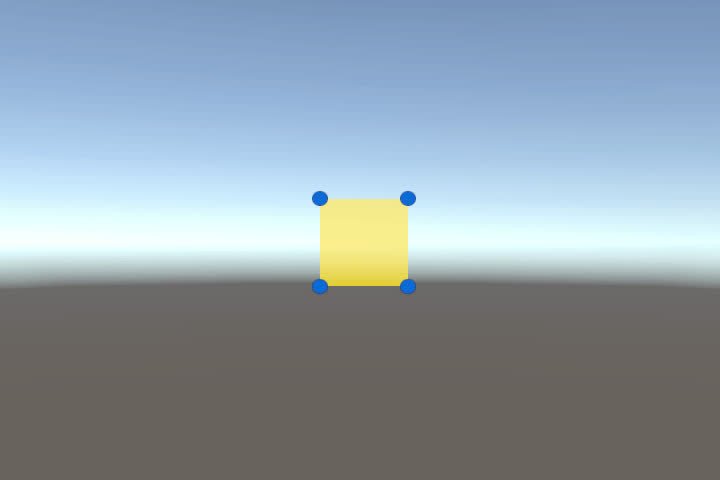
Area Handles System
UI element that can be move and resized in Game
Completed
Message System
Lightweight popup/message UI system with queues and callbacks.
Completed
QR Generator
Generates QR codes into UI images for links, invites or session IDs.
Completed
Text Typer System
Component that display text on screen with typing—revealing effect
Completed