 UGTKengine within an engine
UGTK / Systems / MobileSystems / Vibration System
Vibration System (MobileSystems) — empty placeholder
Summary
⚠️ This module is an empty stub. The working vibration system is another one.
Use UtilitySystems/VibrationSystem instead: that one has the real
Mn_VibrationManagersingleton (light / medium / heavy pulses, custom durations, patterns, gamepad rumble) andMn_SpatialVibrationEmitterfor 3D directional haptics.
MobileSystems/VibrationSystem contains a single Mn_VibrationManager that is a bare MonoBehaviour
with an empty Start and an empty Update. It has no field, no method and does nothing at all. It
is reserved space for a future mobile-specific haptics layer.
Careful: this class has the same name as the working one
(UGTK.MobileSystems.VibrationSystem.Mn_VibrationManager vs
UGTK.UtilitySystems.VibrationSystem.Mn_VibrationManager). If Mn_VibrationManager in your scene
does nothing, check which of the two you actually added — the namespace in the inspector's Script
field tells you.
Content
Modules Dependencies
None — the assembly definition declares no reference.
Setup
Nothing to set up, and nothing to show in a GIF: the component has no behaviour. Do not add it to a scene expecting vibration.
How To Use
There is nothing to use. Import UtilitySystems/VibrationSystem and call:
Mn_VibrationManager.Instance.VibrateLight();
Mn_VibrationManager.Instance.VibrateMilliseconds(80);
Mn_VibrationManager.Instance.VibratePattern(new[] { 30, 50, 90, 60, 120 }, -1);
Testing Scene
Open Debug/MobileVibrationScene.unity. It holds one object, MobileVibrationManager, carrying
this module's Mn_VibrationManager. There is nothing to press, and the inspector explains why.
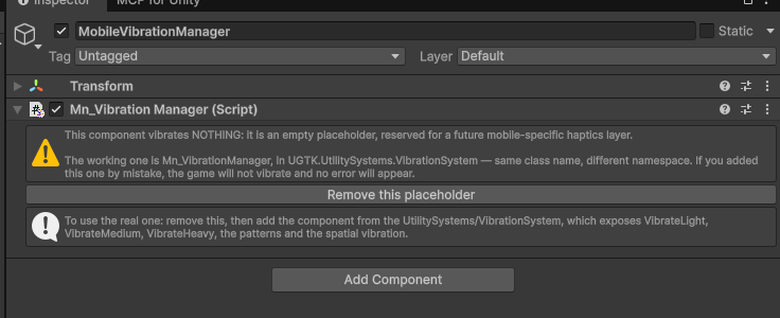
This component vibrates nothing. It is an empty placeholder, reserved for a future mobile-specific haptics layer that does not exist yet.
The trap it exists to warn about is the name. The working component is also called
Mn_VibrationManager — same class name, different namespace, in
UGTK.UtilitySystems.VibrationSystem.
Add the wrong one and the game simply does not vibrate: no error, no warning, nothing in the console
to look for. That is exactly the kind of silence that costs an afternoon, which is why the inspector
says it out loud and offers a Remove this placeholder button.
Use the one in UtilitySystems/VibrationSystem: it exposes VibrateLight, VibrateMedium,
VibrateHeavy, the patterns and the spatial vibration, and it is the one with a test scene worth
opening.
Technical Info
| Path | Content |
|---|---|
Scripts/Mn_VibrationManager.cs |
Empty MonoBehaviour in namespace UGTK.MobileSystems.VibrationSystem: empty Start, empty Update |
© 2026 Marcello De Bonis. All rights reserved